
Purpose of Quick Setup
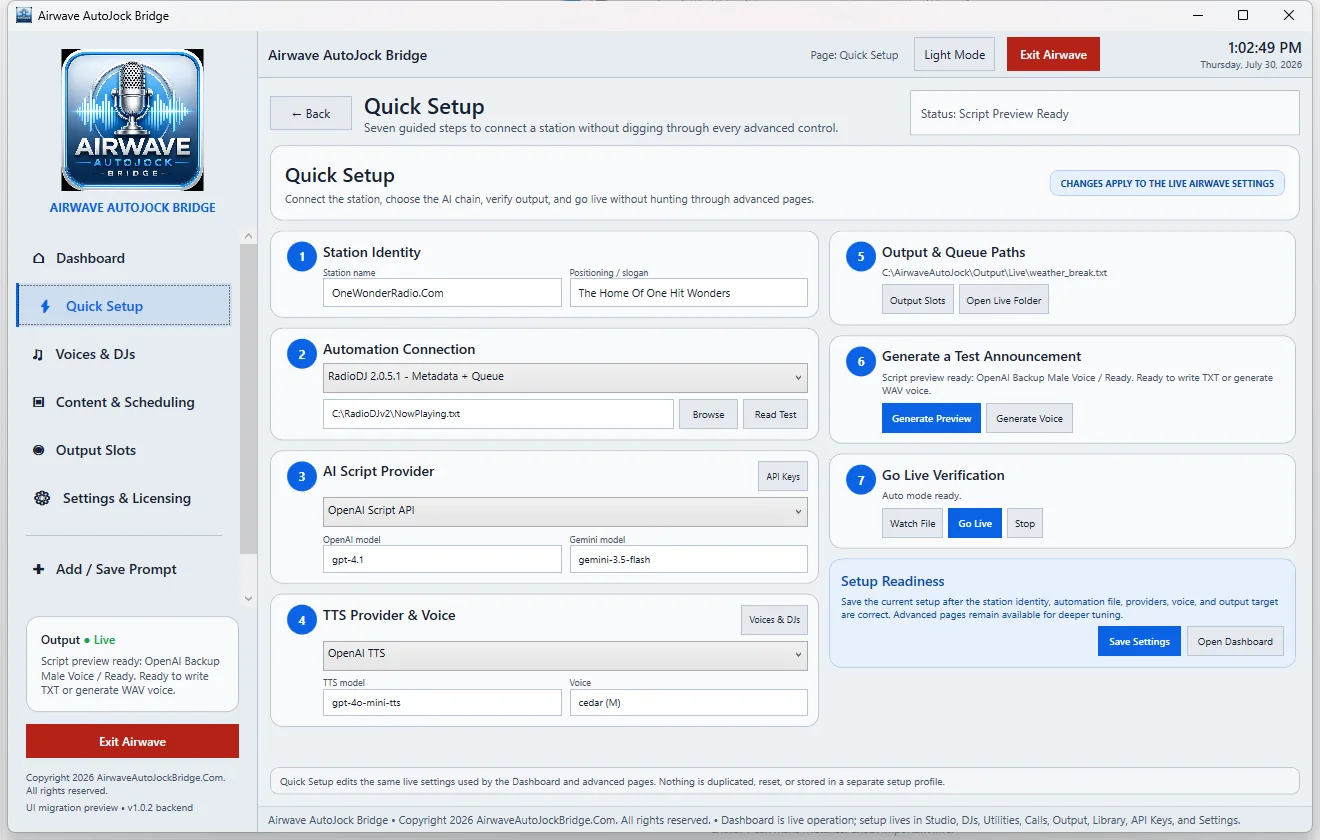
Quick Setup is the fastest way to connect a station without searching through every advanced page. Changes made here apply to the live Airwave settings; it does not create a separate setup profile.
The seven guided steps
- Station Identity: enter the station name and positioning statement or slogan.
- Automation Connection: choose the playout workflow, browse to the export file, and use Read Test.
- AI Script Provider: choose the script provider and the available script model.
- TTS Provider & Voice: choose the voice provider, model, and voice.
- Output & Queue Paths: open Output Slots or the Live folder to verify delivery locations.
- Generate a Test Announcement: generate a preview first, then render voice audio.
- Go Live Verification: watch the export file and start live operation only after the previous steps pass.
Save and verify
Select Save Settings, open the Dashboard, and confirm that the status card, provider chain, output slot, and automation monitor all match the choices you made.