
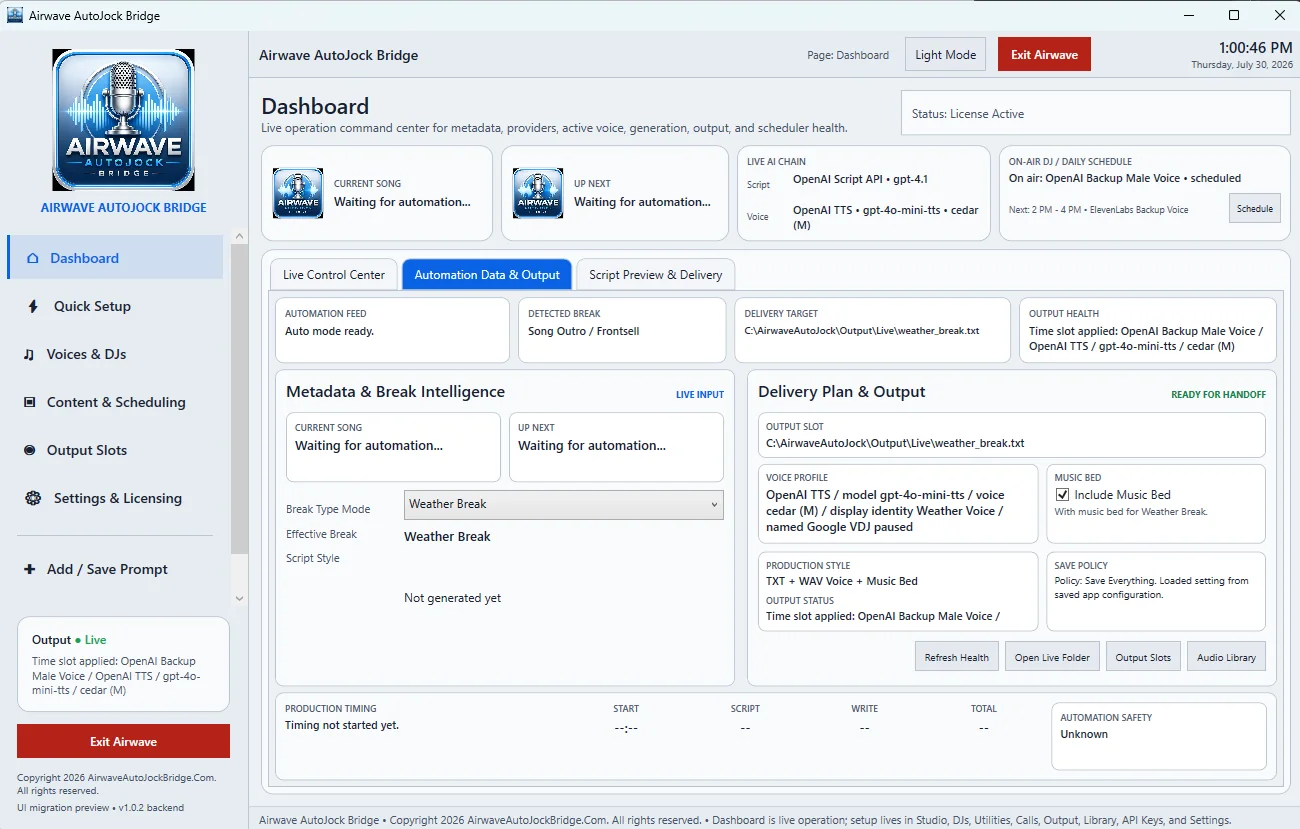
Automation feed
The feed card shows whether Airwave is ready, watching an export, or waiting for usable metadata. The Current Song and Up Next cards display the fields received from the selected automation workflow.
Metadata and break intelligence
Break Type Mode determines the production type Airwave should prepare. The effective type can be a song break, weather break, station liner, timed utility, news break, birthday, phone segment, or other supported slot.
Delivery plan and output
- Output Slot: the target TXT/WAV slot.
- Voice Profile: the effective TTS provider, model, voice, and display identity.
- Music Bed: whether the selected production includes a bed.
- Production Style: TXT-only or TXT plus generated voice and bed.
- Save Policy: whether generated audio is retained in the reusable library.
Health and navigation buttons
Use Refresh Health to reread the delivery state, Open Live Folder to inspect the files, Output Slots to manage fixed targets, and Audio Library to review saved production.